幕后揭秘:Blaze 如何加速 Blade 模板

如果你今年参加了 Laracon US 大会,或者你对 Livewire 非常熟悉,那么你可能已经听说过 Blaze 了。Blaze 是一个全新的即插即用包(由 Livewire 团队开发,但它适用于所有 Blade 模板网站),旨在显著优化 Laravel 渲染 Blade 组件的方式。你可以这样理解:即使是一个简单的 <x-component /> 标签也会影响运行时性能,而 Blaze 可以帮助我们消除这些性能负担。
感兴趣吗?学习如何使用 Blaze 的最佳方法是直接查看 Blaze 的 README 文件,其中涵盖了安装和自定义步骤。
在这里,我们将通过从零开始构建两个功能逐步增强的 Blaze 示例,来探索 Blaze 的底层工作原理。我们将从简单的开始,逐步增加复杂性,直到构建出一个与真正的 Blaze 功能类似的示例。这将帮助你更好地理解 Blaze 每次处理模板时发生的情况。
安装 Blaze
让我们开始吧!运行以下命令将 Blaze 安装到你的 Laravel 项目中:
composer require livewire/blaze如果你有一个使用 Flux 的 Livewire 应用,那就完成了!Blaze 将自动启动并优化你的 Flux 组件。以下是使用 Livewire、Flux 和 Blaze 的应用的优化前后对比;你在这里看到的性能叠加层是 Blaze 自带的工具:
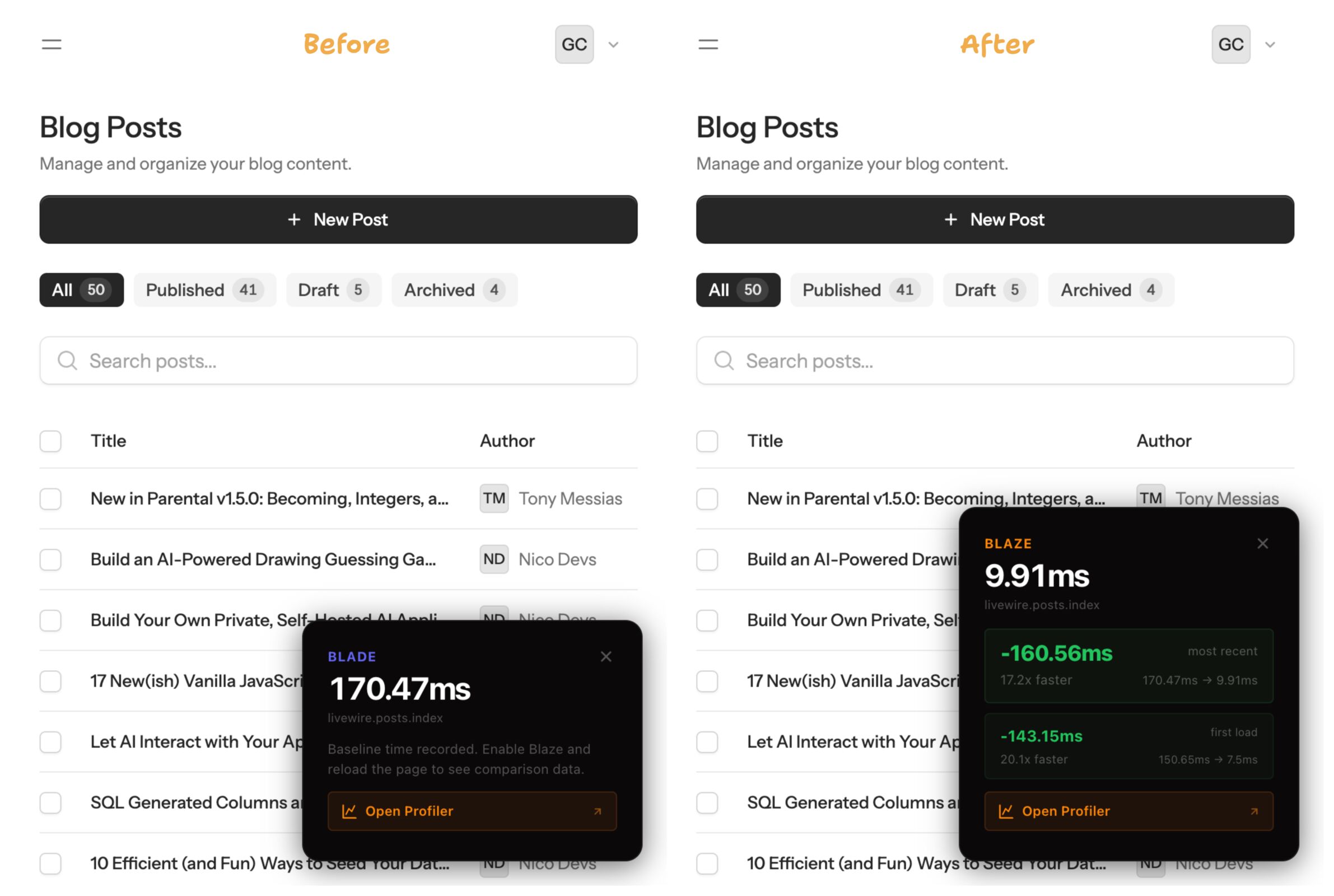
哇,真快!
不过,请记住,Blaze 并不局限于 Livewire 或 Flux——你可以在任何 Laravel 项目中使用它。你可以在 Blade 文件的顶部添加 @blaze 指令,从而在单个组件上运行 Blaze:
@blaze

The rest of the component template goes here.
或者,你可以将 Blaze 指向服务提供商提供的整个目录:
use Livewire\Blaze\Blaze;

/**
 * Bootstrap any application services.
 */
public function boot(): void
{
    Blaze::optimize()->in(resource_path('views/components'));

    // ...
}
Blaze 如何优化 Laravel 应用
Blaze 通过将工作从运行时转移到编译时来实现性能提升。它提供了三种优化策略:
- 函数编译器(默认,始终启用):将组件编译成纯 PHP 函数,绕过 Laravel 的标准渲染管道。仅此一项就能消除 91-97% 的开销,并且几乎适用于所有组件。
- 记忆化(可选):对重复出现且具有相同 props 的组件,缓存每次请求的渲染输出。
- 编译时折叠(可选;最激进):在编译期间预渲染组件,并将生成的 HTML 直接嵌入到模板中。组件在运行时完全消失。
尽管函数编译器是默认设置,但它实际上是 Blaze 的最新功能;编译时折叠才是 Blaze 的起源。它借鉴了一种名为常量折叠的经典编译器设计技术,我们将在下文中详细介绍!
为了理解这些优化机制的底层原理,我们将从零开始构建两个基本克隆版本:Smol Blaze 将重点展示编译时折叠。接下来,我们将更进一步,构建 Lil Blaze,并添加完整的流水线——包括函数编译器(Blaze 的默认策略)——以说明 Blaze 的结构。
什么是常量折叠?
刚才我们提到了一堆抽象术语,现在让我们来谈谈常量折叠的实际作用。
在编译器优化中,常量折叠会在编译期间将类似 3 + 5 的表达式简化为 8,避免在运行时进行计算,从而节省 CPU 资源。
假设你像这样声明了 MAX_UPLOAD_SIZE:
// Source
const MAX_UPLOAD_SIZE = 10 * 1024 * 1024; // 10MB in bytes
具有常量折叠功能的编译器会预先计算表达式的值,并将其替换为计算结果:
// After constant folding
const MAX_UPLOAD_SIZE = 10485760;
这是一个简单的例子,但希望你能明白,在大型代码库中,未解析的表达式会如何迅速累积。在编译时解析这些常量可以显著提升速度。
常量折叠如何加速 Blade 组件?
假设你定义了 <x-alert type="error" />,如下所示:
@props(['type' => 'info'])

<div class="{{ $type }}">{{ $slot }}</div>
然后,我们可以这样使用:
<x-alert type="error">
    I'm sorry dave, I'm afraid I can't do that.
</x-alert>
PHP,我们挚爱的运行时语言和救星,无法直接解析 Blade 模板,因此 Blade 编译器需要将 Blade 组件(请原谅我的重复)编译成 PHP 可以执行的代码。以下是编译后的 <x-alert type="error" … 代码(不必担心代码的具体细节,只需关注其结构即可):
<?php $attributes ??= new \Illuminate\View\ComponentAttributeBag;

$__newAttributes = [];
$__propNames = \Illuminate\View\ComponentAttributeBag::extractPropNames((['type' => 'info']));

foreach ($attributes->all() as $__key => $__value) {
    if (in_array($__key, $__propNames)) {
        $$__key = $$__key ?? $__value;
    } else {
        $__newAttributes[$__key] = $__value;
    }
}

$attributes = new \Illuminate\View\ComponentAttributeBag($__newAttributes);

unset($__propNames);
unset($__newAttributes);

foreach (array_filter((['type' => 'info']), 'is_string', ARRAY_FILTER_USE_KEY) as $__key => $__value) {
    $$__key = $$__key ?? $__value;
}

$__defined_vars = get_defined_vars();

foreach ($attributes->all() as $__key => $__value) {
    if (array_key_exists($__key, $__defined_vars)) unset($$__key);
}

unset($__defined_vars, $__key, $__value); ?>

<div class="<?php echo e($type); ?>"><?php echo e($slot); ?></div><?php /**PATH /resources/views/components/alert.blade.php ENDPATH**/ ?>
现在,每当我们使用 <x-alert /> 组件时,使用它的 Blade 视图都会像这样进行转换——再次强调,不必完全理解,只需看看我们做了什么:
<?php if (isset($component)) { $__componentOriginal5194778a3a7b899dcee5619d0610f5cf = $component; } ?>
<?php if (isset($attributes)) { $__attributesOriginal5194778a3a7b899dcee5619d0610f5cf = $attributes; } ?>
<?php $component = Illuminate\View\AnonymousComponent::resolve(['view' => 'components.alert','data' => ['type' => 'error']] + (isset($attributes) && $attributes instanceof Illuminate\View\ComponentAttributeBag ? $attributes->all() : [])); ?>
<?php $component->withName('alert'); ?>
<?php if ($component->shouldRender()): ?>
<?php $__env->startComponent($component->resolveView(), $component->data()); ?>
<?php if (isset($attributes) && $attributes instanceof Illuminate\View\ComponentAttributeBag): ?>
<?php $attributes = $attributes->except(\Illuminate\View\AnonymousComponent::ignoredParameterNames()); ?>
<?php endif; ?>
<?php $component->withAttributes(['type' => 'error']); ?>
    I'm sorry dave, I'm afraid I can't do that.
 <?php echo $__env->renderComponent(); ?>
<?php endif; ?>
<?php if (isset($__attributesOriginal5194778a3a7b899dcee5619d0610f5cf)): ?>
<?php $attributes = $__attributesOriginal5194778a3a7b899dcee5619d0610f5cf; ?>
<?php unset($__attributesOriginal5194778a3a7b899dcee5619d0610f5cf); ?>
<?php endif; ?>
<?php if (isset($__componentOriginal5194778a3a7b899dcee5619d0610f5cf)): ?>
<?php $component = $__componentOriginal5194778a3a7b899dcee5619d0610f5cf; ?>
<?php unset($__componentOriginal5194778a3a7b899dcee5619d0610f5cf); ?>
<?php endif; ?><?php /**PATH /resources/views/index.blade.php ENDPATH**/ ?>
对于一个简单的组件来说,这开销也太大了!想象一下,这会给包含众多组件的大型代码库增加多少臃肿。而使用组件库时,这种情况会更加严重。
Smol Blaze:仅折叠
我们将实现“Smol Blaze”,在编译时读取组件的源代码,并将生成的 HTML 直接内联到模板中。此演示特意保持简洁,仅涉及折叠功能,但有助于说明其中的运作机制。我们将所有组件都放在 AppServiceProvider 中,并且与 Blaze 类似,使用正则表达式(尽管我们会花时间解释其中的奥秘)。
我们将使用 Blade 的 prepareStringsForCompilationUsing() hook,以便在 Blade 编译之前拦截原始模板字符串:
// App/Providers/AppServiceProvider.php
public function register(): void
{
    Blade::prepareStringsForCompilationUsing(function (string $template) {
        return $this->foldComponents($template);
    });
}
让我们用一段正则表达式扫描模板,查找自闭合组件标签(例如 <x-icon name="user" />)。请查看正则表达式模式:
protected function foldComponents(string $template): string
{
    return preg_replace_callback(
        '/<x-(\w+)\s+([^>]+?)\/>/i',
        fn ($matches) => $this->foldComponent($matches[1], $matches[2]),
        $template
    );
}
现在,对于每一对匹配项,我们来查找对应的 Blade 文件。如果该文件不存在,我们将退出并返回原始标签。
protected function foldComponent(string $name, string $attributes): string
{
    $path = resource_path("views/components/{$name}.blade.php");

    if (! file_exists($path)) {
        return "<x-{$name} {$attributes} />";
    }

    $source = file_get_contents($path);

    $source = preg_replace('/@\w+[^\n]*\n?/', '', $source);

    return $this->replaceAttributes($source, $attributes);
}
最后,我们需要解析属性字符串,并将相应的变量替换到组件源代码中。
protected function replaceAttributes(string $html, string $attributes): string
{
    preg_match_all('/(\w+)="([^"]*)"/', $attributes, $matches, PREG_SET_ORDER);

    foreach ($matches as $match) {
        $key = $match[1];
        $value = $match[2];
        $html = str_replace('{{ $' . $key . ' }}', $value, $html);
    }

    return $html;
}
最终的 AppServiceProvider 应该如下所示:
<?php

namespace App\Providers;

use Illuminate\Support\Facades\Blade;
use Illuminate\Support\ServiceProvider;

class AppServiceProvider extends ServiceProvider
{
    public function register(): void
    {
        Blade::prepareStringsForCompilationUsing(function (string $template) {
            return $this->foldComponents($template);
        });
    }

    public function boot(): void {}

    private function foldComponents(string $template): string
    {
        return preg_replace_callback(
            '/<x-(\w+)\s+([^>]+?)\/>/i',
            fn ($matches) => $this->foldComponent($matches[1], $matches[2]),
            $template
        );
    }

    private function foldComponent(string $name, string $attributes): string
    {
        $path = resource_path("views/components/{$name}.blade.php");

        if (! file_exists($path)) {
            return "<x-{$name} {$attributes} />";
        }

        $source = file_get_contents($path);

        $source = preg_replace('/@\w+[^\n]*\n?/', '', $source);

        return $this->replaceAttributes($source, $attributes);
    }

    private function replaceAttributes(string $html, string $attributes): string
    {
        preg_match_all('/(\w+)="([^"]*)"/', $attributes, $matches, PREG_SET_ORDER);

        foreach ($matches as $match) {
            $key = $match[1];
            $value = $match[2];
            $html = str_replace('{{ $'.$key.' }}', $value, $html);
        }

        return $html;
    }
}
至此,我们就得到了一个过于简化的常量折叠编译时 Blade 优化器。
Lil Blaze:完整的优化流程
Smol Blaze 仅处理带有静态属性的自闭合标签,无法处理开始/结束标签对、动态属性、插槽或嵌套组件。让我们来解决这个问题!Lil Blaze 的转换之旅也始于 Blade::prepareStringsForCompilationUsing,但模板会经过一系列离散阶段的流程:
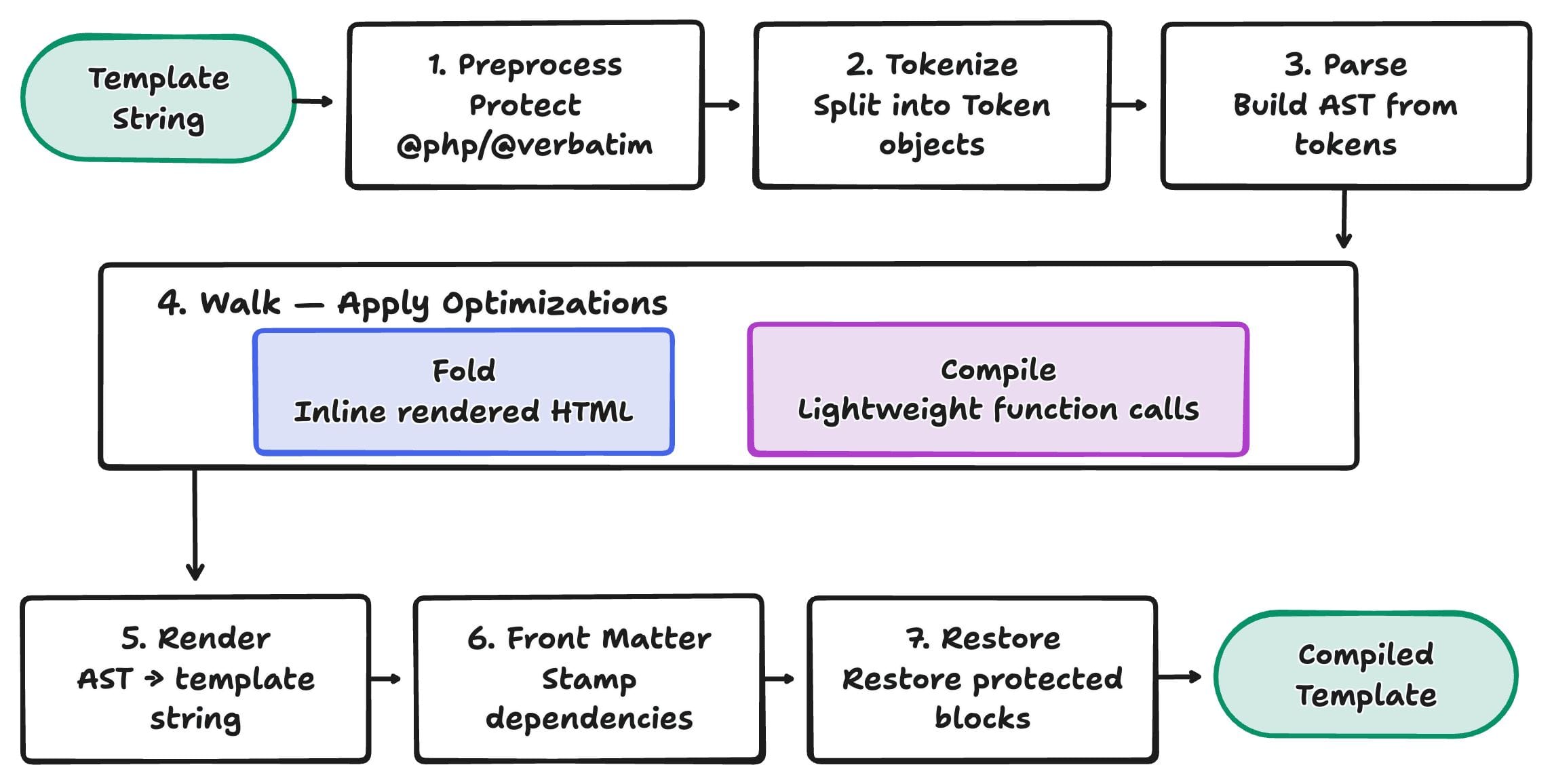
我们先来搭建流程框架。LilBlaze.php 类将作为入口点,每个步骤都将调用该类中的一个私有方法:
// app/LilBlaze/LilBlaze.php
<?php

namespace App\LilBlaze;

class LilBlaze
{
    private array $folded = [];

    public function compile(string $template): string
    {
        // Protect @php/@verbatim blocks
        [$template, $blocks] = $this->store($template);

        // Split into tokens
        $tokens = $this->tokenize($template);

        // Build AST from tokens
        $nodes = $this->parse($tokens);

        // Apply optimization
        $this->walk($nodes);

        // Render AST back to string
        $output = implode('', array_map(fn ($n) => $n->render(), $nodes));

        // Stamp folded dependencies
        $output = $this->stamp($output);

        // Restore protected blocks
        return $this->restore($output, $blocks);
    }
}
预处理
在进行词法分析之前,我们需要保护可能包含显式代码的区块。
// app/LilBlaze/LilBlaze.php
private function store(string $template): array
{
    $blocks = [];
    $counter = 0;

    $replace = function ($m) use (&$blocks, &$counter) {
        $placeholder = "__LILBLAZE_BLOCK_{$counter}__";
        $blocks[$placeholder] = $m[0];
        $counter++;

        return $placeholder;
    };

    $template = preg_replace_callback('/@verbatim(.*?)@endverbatim/s', $replace, $template);

    // Same pattern for @php ... @endphp blocks
    $template = preg_replace_callback('/@php(.*?)@endphp/s', $replace, $template);

    return [$template, $blocks];
}
在管道的末端,restore() 函数会将原始代码块恢复原状:
private function restore(string $template, array $blocks): string
{
    foreach ($blocks as $placeholder => $original) {
        $template = str_replace($placeholder, $original, $template);
    }

    return $template;
}
Blaze 也做了类似的事情,但它通过反射在词法分析之前调用 Laravel 的私有方法 BladeCompiler::storeUncompiledBlocks()。
词法分析
在词法分析过程中,我们实际上是将源代码转换成类型化的代码块(每个代码块称为一个词元),并将其组织成一个更大的数据结构(抽象语法树,AST)。
我们的流程将使用三个小类来构建词元;首先是 Token 类:
// app/LilBlaze/Token.php
class Token
{
    public function __construct(
        // 'text', 'tag_open', 'tag_close', 'tag_self_close'
        public readonly string $type,
        // raw matched string
        public readonly string $content,
        // component name
        public readonly string $name = '',
        // attribute string (the 'type="error" class="bold"' in <x-alert type="error" class="bold">)
        public readonly string $attributes = '',
    ) {}
}
我们的解析器会将词元组织成一个由两种节点类型组成的抽象语法树(AST)。文本节点(TextNode)是叶子节点,可以是纯文本或已处理过的 HTML:
// app/LilBlaze/TextNode.php
class TextNode
{
    public function __construct(
        public readonly string $content,
    ) {}

    public function render(): string
    {
        return $this->content;
    }
}
ComponentNode 更复杂;它可以有子元素(文本、嵌套组件、插槽),并且如果没有策略处理,它知道如何将自身渲染回 Blade 标签:
// app/LilBlaze/ComponentNode.php
class ComponentNode
{
    public array $children;

    public function __construct(
        public readonly string $name,
        public readonly string $attributes = '',
        array $children = [],
        public readonly bool $selfClosing = false,
    ) {
        $this->children = $children;
    }

    public function render(): string
    {
        $attrs = $this->attributes ? " {$this->attributes}" : '';

        if ($this->selfClosing) {
            return "<x-{$this->name}{$attrs} />";
        }

        $children = implode('', array_map(fn ($n) => $n->render(), $this->children));

        return "<x-{$this->name}{$attrs}>{$children}</x-{$this->name}>";
    }
}
…(to be continued)
 上一篇
上一篇 
 QQ 空间
QQ 空间
 QQ 好友
QQ 好友
 微博
微博